Best Wi-Fi Access Points:
A Comprehensive Guide to Choosing the Right One for Your Network
In today’s digital age, reliable and fast Wi-Fi is no longer a luxury but a necessity. Whether you’re running a business, streaming your favorite shows, or working from home, a solid Wi-Fi connection is essential for seamless connectivity. One of the key components that determine the quality and coverage of your Wi-Fi network is the Wi-Fi access point (AP).
This article will guide you through understanding Wi-Fi access points, the different types available, and why Ubiquiti is often considered a top choice for both home users and businesses.
What is a Wi-Fi Access Point?
A Wi-Fi Access Point (AP) is a device that enables wireless devices to connect to a wired network using Wi-Fi. Essentially, it serves as a bridge between the wired router or network switch and the wireless devices (like smartphones, laptops, or tablets) in your network. Access points play a critical role in improving wireless coverage and managing network traffic.
Without an access point, your Wi-Fi network would only be able to support a limited range or number of devices. The more APs you have, the better the coverage and the greater the capacity for simultaneous connections.
The Different Types of Wi-Fi Access Points
Wi-Fi access points vary based on the needs of your network. Here’s a breakdown of the types of access points you can choose from:
1. Standalone Access Points
Standalone access points are standalone devices that connect directly to your network. They do not require a controller or additional management software. These are ideal for smaller setups or for users who want a simple, plug-and-play solution.
Pros:
- Easy to set up.
- Cost-effective for small networks.
- No need for additional equipment.
Cons:
- Limited scalability.
- More management overhead if you add additional APs.
2. Controller-Based Access Points
Controller-based access points require a central controller to manage the entire network of APs. The controller ensures that each access point operates seamlessly, making it easier to deploy multiple APs across large spaces like offices, schools, or warehouses.
Pros:
- Centralized management makes it easier to control large networks.
- Seamless roaming between access points, meaning users won’t experience a drop in connection as they move between APs.
- Scalable for large networks.
Cons:
- More complex setup and maintenance.
Additional costs due to the controller hardware and software.
3. Mesh Wi-Fi Systems
Mesh Wi-Fi systems are designed to cover a larger area than standalone access points. These systems use multiple access points to create a single, unified network. The devices communicate with each other to extend coverage, creating a “mesh” of Wi-Fi access points that can be placed throughout your home or business.
Pros:
- Wide coverage without dead spots.
- Simple to set up and manage.
- Perfect for large homes or offices where a single access point would be inadequate.
Cons:
- More expensive than traditional APs.
- Limited customization and control over individual access points.
4. Outdoor Access Points
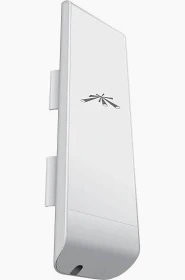
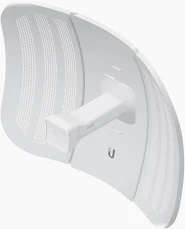
Outdoor Wi-Fi access points are designed for outdoor use and are built to withstand harsh weather conditions. These APs are often used for large outdoor venues, like sports stadiums, public parks, and resorts. They are equipped with robust antennas to ensure reliable coverage even in open areas.
Pros:
- Ideal for outdoor environments.
- High durability.
- Provides coverage over a larger, outdoor area.
Cons:
- More expensive than indoor APs.
- May require additional setup for weatherproofing and power.
5. Dual-Band and Tri-Band Access Points
Wi-Fi access points are typically available in either dual-band or tri-band configurations. Dual-band APs support both the 2.4 GHz and 5 GHz frequencies, while tri-band APs include an additional 5 GHz band, which helps reduce congestion and improves performance for multiple devices.
Dual-Band Access Points:
- Pros: Offers better coverage and speeds, balancing the load between 2.4 GHz and 5 GHz.
- Cons: May experience congestion if too many devices are connected to the same frequency.
Tri-Band Access Points:
- Pros: Ideal for homes or businesses with many devices. The additional 5 GHz band helps reduce interference and network congestion.
Cons: More expensive and may not always be necessary for smaller networks.
6. PoE (Power over Ethernet) Access Points
PoE access points are powered via the Ethernet cable itself, eliminating the need for a separate power source. This is especially useful for installing APs in locations where a power outlet is not easily accessible.
Pros:
- Simplifies installation by requiring only an Ethernet cable.
- Provides flexibility in positioning the AP.
- Reduces cable clutter.
Cons:
- Requires PoE-enabled switches or injectors, adding to the cost.

UBIQUITI
Why Ubiquiti Is a Solid Choice for Wi-Fi Access Points
When choosing a Wi-Fi access point, one name that consistently stands out is Ubiquiti. Ubiquiti Networks is known for providing high-quality networking hardware at an affordable price point, making it an attractive option for both home users and businesses alike. Here are some reasons why Ubiquiti is often considered a solid choice for Wi-Fi access points.
1. Ease of Use and Management
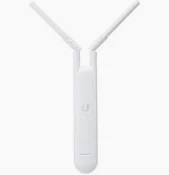
Ubiquiti’s UniFi series of access points is particularly popular because of its easy-to-use management platform. The UniFi Controller software provides a centralized management interface where you can configure, monitor, and troubleshoot your network with ease. Even if you’re new to networking, Ubiquiti makes it simple to get everything up and running.
For advanced users, the software provides a wealth of features, including traffic analysis, guest network creation, and advanced security settings, allowing you to fine-tune your network to meet specific needs.
2. Scalability
Ubiquiti’s UniFi access points are known for their scalability. If you start with one or two APs and your network grows, you can add more access points without much hassle. The UniFi Controller can manage hundreds of APs simultaneously, making it an excellent choice for growing businesses or large homes with evolving network demands.
Whether you need to cover a single room or an entire campus, Ubiquiti access points can be easily scaled to meet your needs. This makes it an ideal solution for both small and large-scale installations.
3. High Performance
Ubiquiti’s access points deliver excellent performance, including fast speeds and low latency. Their dual-band and tri-band access points are designed to handle high traffic loads and maintain reliable connections even in congested environments.
The UniFi APs are built with the latest Wi-Fi standards, such as Wi-Fi 6 (802.11ax), providing faster speeds, improved range, and better overall performance. Ubiquiti also uses advanced technology like MU-MIMO (multi-user, multiple input, multiple output) to support multiple devices simultaneously without sacrificing speed or performance.
4. Affordable Pricing
One of Ubiquiti’s standout features is its competitive pricing. Their products provide enterprise-grade performance at a fraction of the cost of other high-end networking equipment. Ubiquiti’s products strike an excellent balance between quality and affordability, making them accessible to a wide range of users—from homeowners to large enterprises.
When compared to other top-tier networking brands, Ubiquiti offers great value for the price, without compromising on performance, features, or support.
5. Reliable and Durable
Ubiquiti’s access points are known for their reliability and durability. Whether you’re installing them in a home or a business, you can count on them to deliver consistent performance for years. Ubiquiti’s hardware is designed to handle high traffic loads and withstand the rigors of continuous use.
In particular, their outdoor access points are built to handle environmental factors such as rain, heat, and dust, making them a go-to choice for outdoor deployments.
6. Security Features
Security is a major concern for any network. Ubiquiti takes security seriously and offers several layers of protection. UniFi access points include robust security features such as WPA3 encryption, guest networks with captive portals, VLAN support for segmenting traffic, and advanced firewall settings. These features help protect both your network and your users from external threats.
7. Wide Range of Products
Ubiquiti offers a wide range of access points that cater to different needs. Whether you’re looking for a simple, budget-friendly access point for a small home or a high-performance enterprise-grade solution for a large office, Ubiquiti has something for you. Their product lineup includes options for indoor and outdoor use, varying performance levels, and different deployment scenarios.
8. Active Community and Support
Ubiquiti has a strong and active community of users and professionals. The forums and online resources provide troubleshooting guides, user-generated tips, and valuable insights, making it easier for both novice and experienced users to solve problems and learn more about their equipment. Additionally, Ubiquiti provides solid customer support if you need help with your hardware or software.
Conclusion:
Choosing Ubiquiti for Your Wi-Fi Access Point Needs
When it comes to choosing a Wi-Fi access point, Ubiquiti stands out as a solid choice for both home and business networks. Their UniFi access points are known for their scalability, performance, ease of use, and affordability, making them a popular choice for users across the globe. Whether you need to set up a small network or a large-scale deployment, Ubiquiti offers reliable and high-performance solutions to meet your needs.
By selecting the right Wi-Fi access point and investing in quality equipment like Ubiquiti, you can ensure that your network remains fast, secure, and capable of supporting all of your devices and applications.

Credits and Information Source: – Ubiquiti UniFi